Manufacturing Software · AI · RFQ Automation
From drawing to decision.
InFaktory reads casting and machining drawings with AI, carries them through engineering review, costing and quotation, and exports a tiered, customer-ready package — built and run inside a real die-casting business.
Live internal platform · early access by request
Why InFaktory Exists
A die-casting RFQ used to live in seven different places.
An enquiry in email. A drawing as a PDF. Costing rebuilt from scratch in Excel for every part. Follow-ups tracked over WhatsApp. A quotation assembled by hand from whichever of those was still open. Every handoff between tools is a place for a transcription error, a lost follow-up, or a quote that goes out without anyone checking the margin.
What Is InFaktory
One platform, built in the order manufacturers actually need it.
InFaktory is an AI-assisted engineering and commercial workflow platform for die-casting manufacturers — an RFQ pipeline, an engineering review workspace, a costing and quotation wizard, role-based approvals, a customer CRM and reporting, sharing the same data and the same identity. InFaktory Engineer — AutoQuote, AutoBalloon and the RFQ Manager — is the whole product today. The rest is stated direction, not shipped functionality.
Engineering intelligence and RFQ automation — AutoQuote, AutoBalloon and the RFQ Manager. This is the product today.
Manufacturing analytics — production performance, OEE and cost intelligence.
Quality and inspection intelligence — inspection documentation and process deviations.
Workflow automation and AI agents for repetitive engineering and administrative work.
Future pillars are directional, as stated by InFaktory — not current product claims.
Product Tour
The actual interface, not an illustration of it.
Every screen below is a real screenshot of the working product, including an actual released drawing it processed.
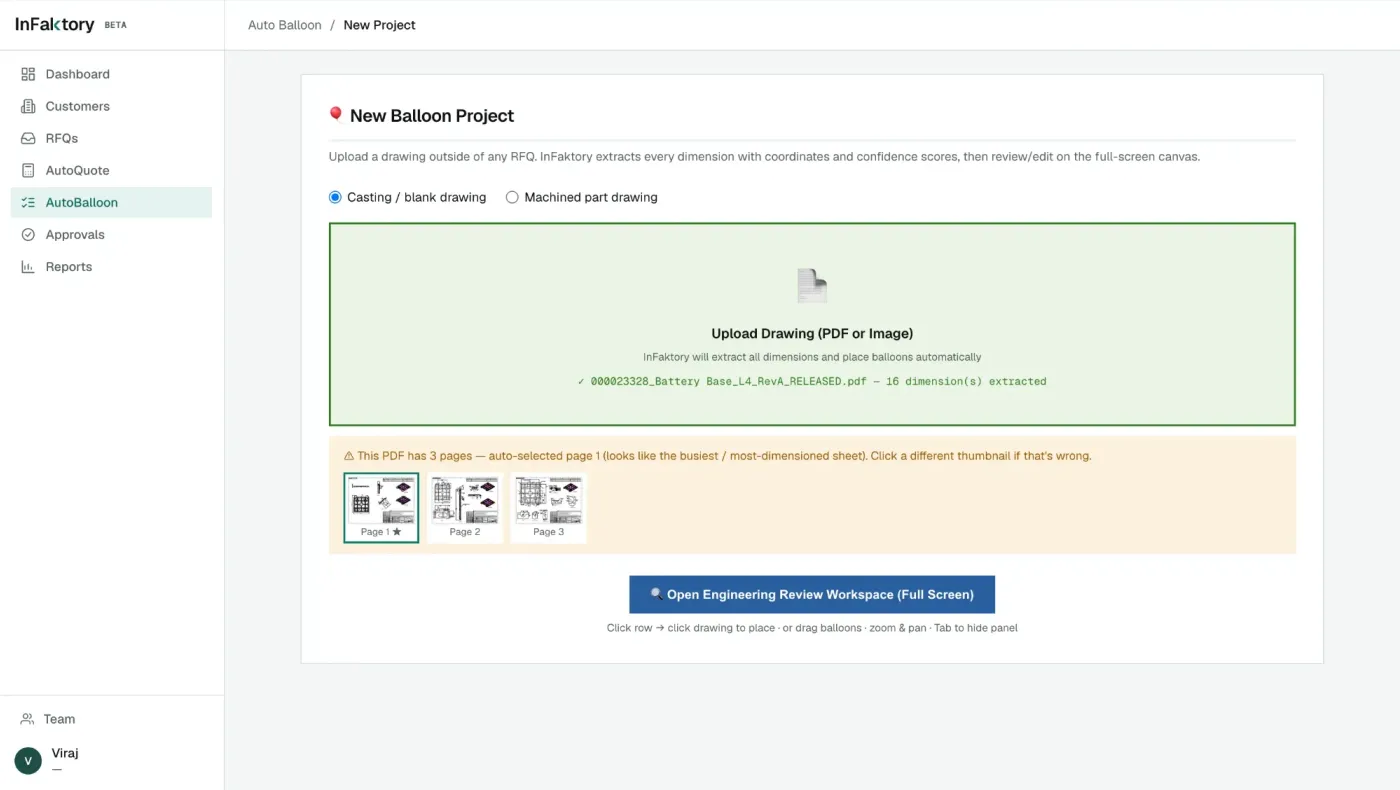
01 / Upload
A drawing arrives, not a blank form.
A casting or machined drawing is uploaded as a PDF or image. In the example captured here — a real, released three-page drawing for a battery base casting — InFaktory auto-selects the busiest, most-dimensioned sheet and has already extracted 16 dimensions before an engineer opens it.
02 / AI Extraction
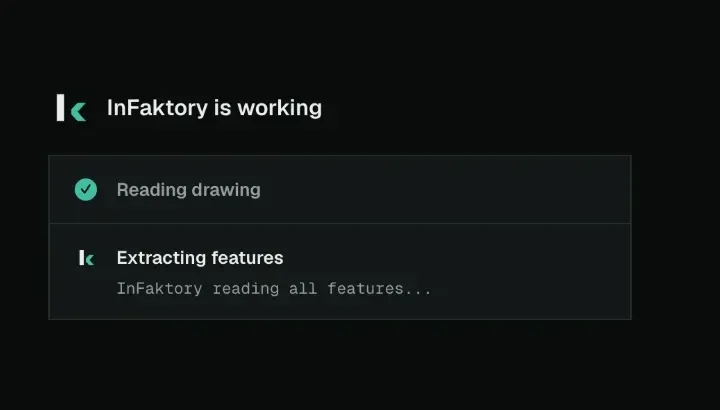
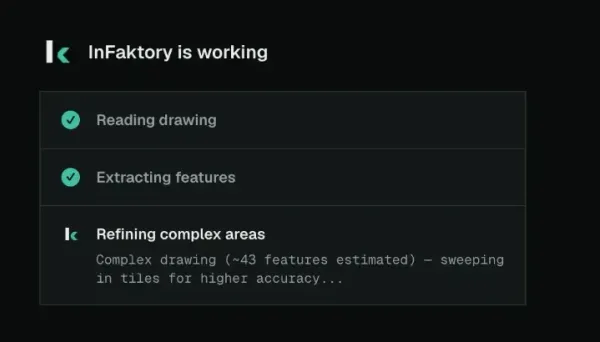
Reading a drawing isn't always one pass.
Title-block data and dimensions are extracted automatically. On a complex drawing, InFaktory estimates feature density first — in this case, roughly 43 features — and sweeps the image in tiles for a more accurate read, rather than quietly guessing on a dense sheet.
03 / Engineering Review
Every characteristic, numbered and scored.
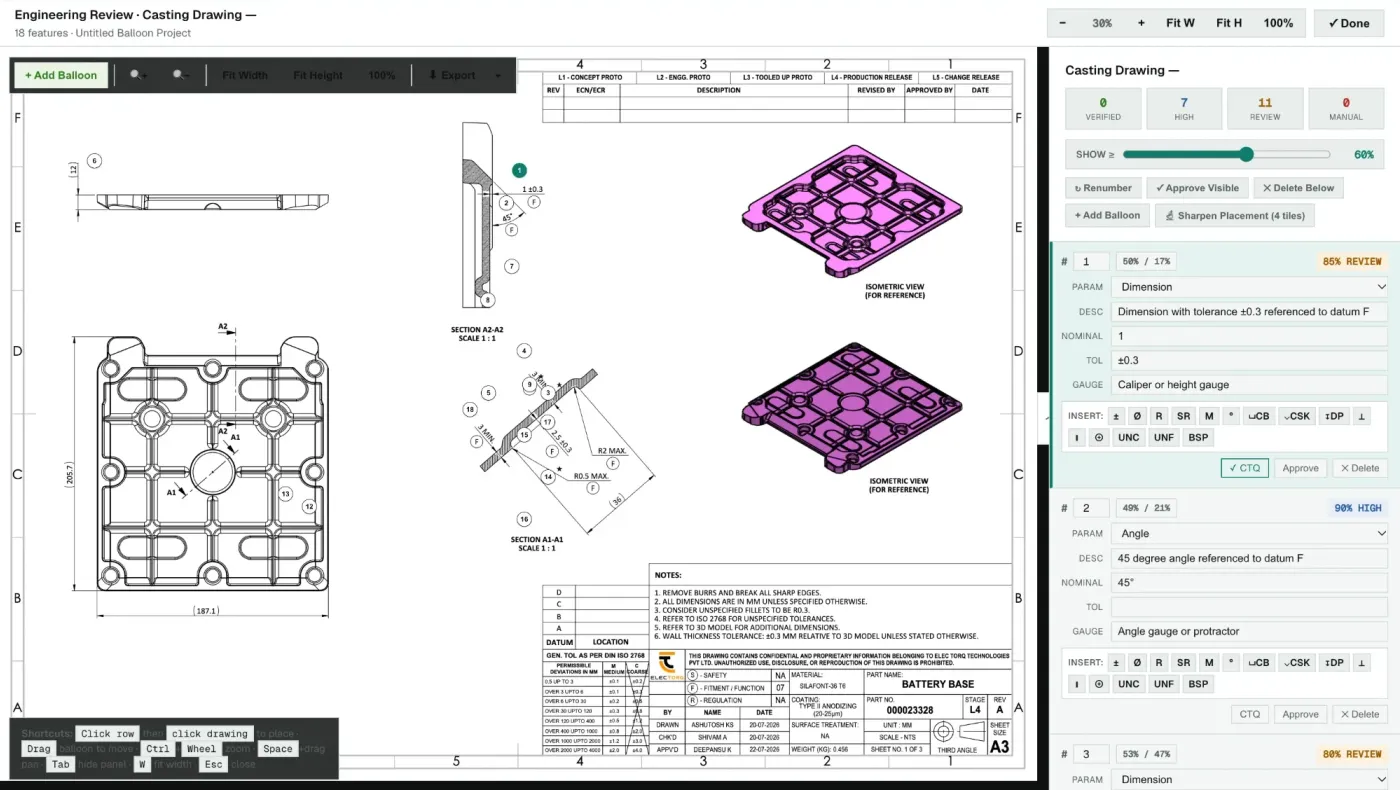
The centrepiece of InFaktory: a full canvas workspace where every GD&T characteristic on the drawing gets a numbered balloon, a confidence score, and a place to approve, correct or reject it before it ever reaches costing.
- 01Confidence is shown, not hidden — balloons 1 and 2 on this real drawing sit at 85% and 90%, and both are flagged Review rather than silently accepted.
- 02Every balloon suggests its own inspection gauge — a caliper or height gauge for a toleranced dimension, an angle gauge for a 45° reference — matched to what that characteristic actually is.
- 03A full GD&T symbol palette sits inline with the balloon entry itself, not in a separate reference sheet an engineer has to switch to.
04 / AutoQuote
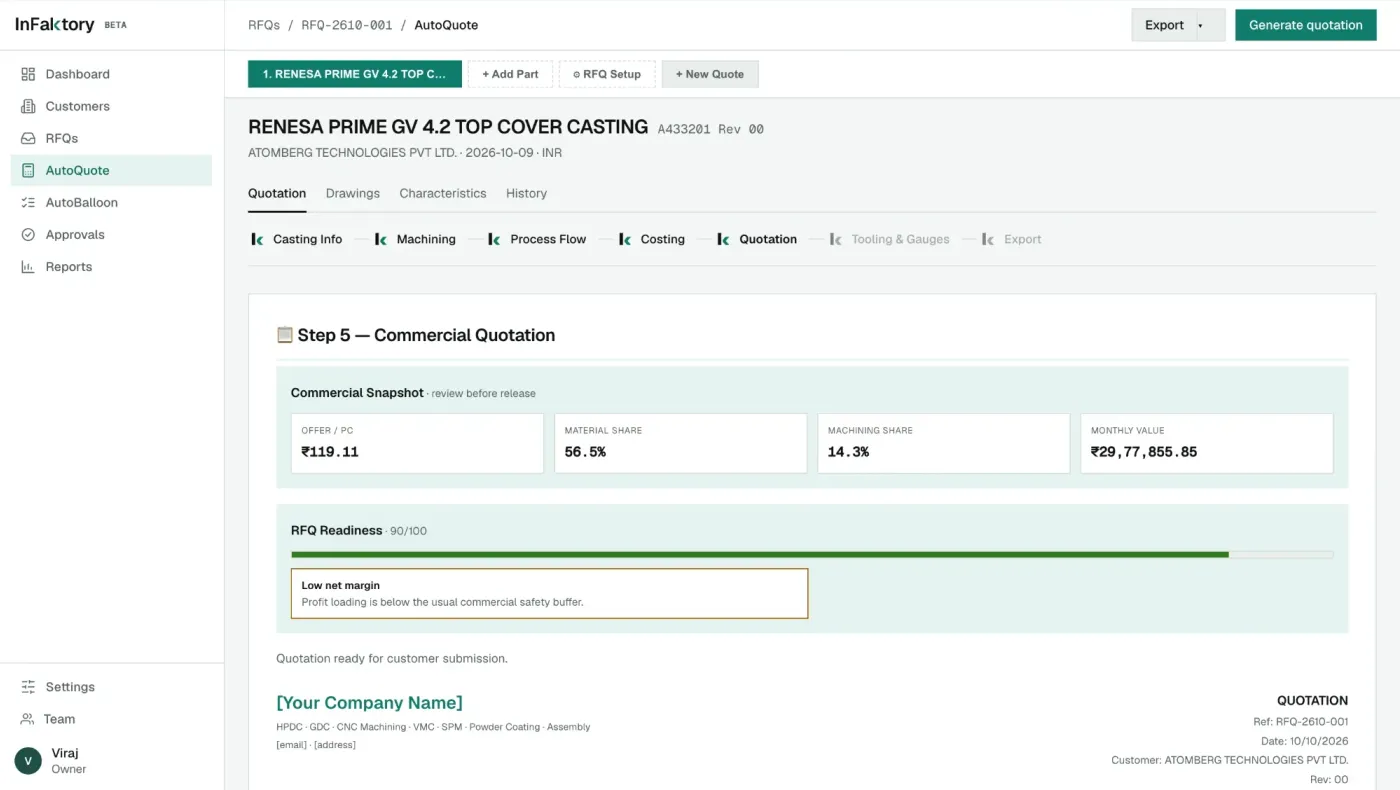
Seven steps. The same data, carried through once.
Casting info, machining, process flow, costing, quotation, tooling and gauges, export — each step reuses what the engineering review already captured, instead of re-entering it. The quotation document itself renders live, built from the same RFQ data start to finish.
05 / Commercial Output
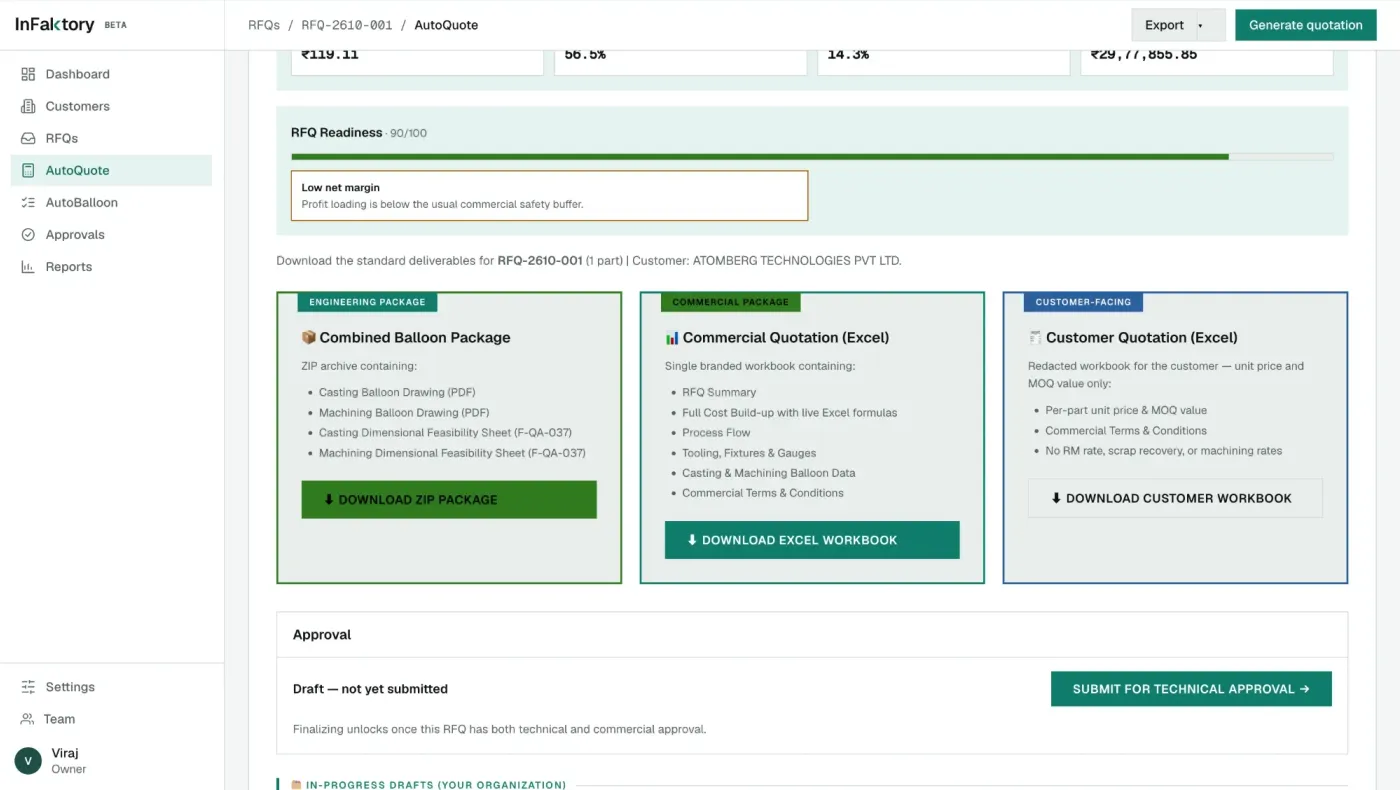
A quote scored before it's sent.
Before export, InFaktory computes an RFQ Readiness score and flags specific commercial risk — in the case captured here, 90/100 with a flagged note that profit loading sat below the usual safety buffer. Nothing goes to a customer on cost alone.
- 01Three exports from one approved RFQ: a full engineering package, an internal commercial workbook with live cost formulas, and a redacted customer-facing workbook.
- 02The customer-facing export shows unit price and MOQ only — no raw material rate, scrap percentage or machining rate is exposed outside the organisation.
Interactive Workflow
What if an RFQ didn't take a week?
Explore how manufacturing workflows can move from disconnected spreadsheets and engineering calculations toward integrated digital systems — the model InFaktory is built around.
Explore InFaktory- 01
RFQ In
A customer enquiry lands in the inbox and enters the pipeline as a new draft.
- 02
Drawing Upload
Casting and machining drawings are uploaded against the RFQ.
- 03
AI Extraction
Title block data and dimensions are read automatically, sweeping complex drawings in tiles for accuracy.
- 04
Engineering Review
Every characteristic is balloon-numbered, confidence-scored and matched to a suggested inspection gauge.
- 05
Process Flow
The actual manufacturing process route is confirmed before costing begins.
- 06
Costing
Material, tooling, machining, rejection rates and forex provisions roll up into a structured cost build.
- 07
Quotation
A customer-ready quotation is generated, scored for commercial readiness before it goes out.
- 08
Approval
Technical and commercial sign-off, role by role, before anything reaches a customer.
- 09
Export
Engineering, internal commercial and redacted customer-facing packages are generated.
- 10
CRM Follow-up
The quotation resolves into a customer record automatically — no re-entry.
- 11
Won / Lost
The outcome is tracked, closing the loop from first enquiry to decision.
Where AI Actually Helps
Specific assistance, not a generic "AI-powered" badge.
Manufacturability judgment, process selection and final commercial sign-off stay with InFaktory's own engineers and management. AI here is scoped to the repetitive data work around those decisions.
Drawing & title-block extraction
Part name, drawing number, revision, material and weight are read directly from an uploaded casting or machining drawing.
Adaptive tile-sweep accuracy
On a dense, complex drawing, extraction doesn't stop at a single pass — it estimates feature count first and sweeps the image in tiles for a more accurate read.
Confidence-scored ballooning
Every GD&T characteristic is numbered and scored — Verified, High, Review or Manual — so an engineer's attention goes where it's actually needed.
Gauge suggestion
Each balloon carries a suggested inspection gauge — a caliper, an angle gauge, an air plug gauge — matched to what that characteristic actually is.
Commercial readiness scoring
Before a quotation is exported, the RFQ is scored and flagged for specific commercial risk, such as margin sitting below the usual safety buffer.
Product Design
A documented design system, not just a working backend.
InFaktory runs on its own token system — typography, colour, spacing, motion — in both light and dark themes, built specifically for dense engineering and costing data rather than adapted from a generic UI kit.
Typography
Geist
Geist Mono, for numbers
Dimensions, tolerances, part numbers and RFQ references use tabular, slashed-zero mono figures — set to align, not just to look technical.
Colour
One teal, used consistently for both primary actions and AI activity — and deliberately never reused for a plain "success" state, so the two stay visually distinct.
Motion
The k-chevron mark
The logo's own chevron doubles as the processing indicator — its two halves separate and re-align while InFaktory is working, reproduced here from the product's real motion values.
Built From Inside Manufacturing
Not a generic SaaS idea looking for an industry.
RFQs, engineering reviews, costing, quotations and follow-ups are processes encountered inside a real manufacturing business — the same one behindSadguru Autocomponents. InFaktory runs on that business's own drawings and its own RFQs, not sample data built to look convincing in a demo.
Product Status
Live, internal, and opening up carefully.
InFaktory is live and in active use inside a real die-casting manufacturing business, running on that business's own drawings and RFQs. It's being made available to a small number of other manufacturers by request, rather than as an open sign-up product. The platform pillars beyond InFaktory Engineer — Data, Quality, Automate — are stated direction, not shipped functionality.
Beyond the Website
Websites are only one layer.
Manufacturing companies also run internal workflows that can be redesigned. From customer acquisition and SEO through to RFQs, engineering and quotations — digital infrastructure can connect the entire commercial process, not just the part a visitor sees first.
See It On Your Own Drawings